Test a PSDK Merge Request
Testing a PSDK Merge Request is another way to contribute to the PSDK engine development. It lets contributors verify new features and bug fixes before they are made available to everyone. This guide explains the necessary tools to do that, how to find a Merge Request, test it, and report the result.
Testing does not require writing Ruby code. A dedicated RubyGem also handles the Git commands needed to set up a project for a Merge Request.
Installing the tools
Prerequisites for the psdk-cli RubyGem
To test a Merge Request, set up a PSDK project on its Git branch. The psdk-cli RubyGem provides command-line tools that make this setup straightforward.
Install Ruby and Git before installing the gem. You will not need to use Git commands yourself, but psdk-cli relies on both tools. Follow the instructions at the beginning of Set up the development environment to install them, then continue with this guide.
Installing the RubyGem
To install the RubyGem, open a terminal and run the following command. Run the cmd.bat file in your PSDK project to open a terminal in that project.
gem install psdk-cli
To confirm the installation, run psdk-use --help. The command should display its available subcommands.
Find a Merge Request to test
Open the PSDK Merge Requests page and look for open Merge Requests with the Need to be tested label.
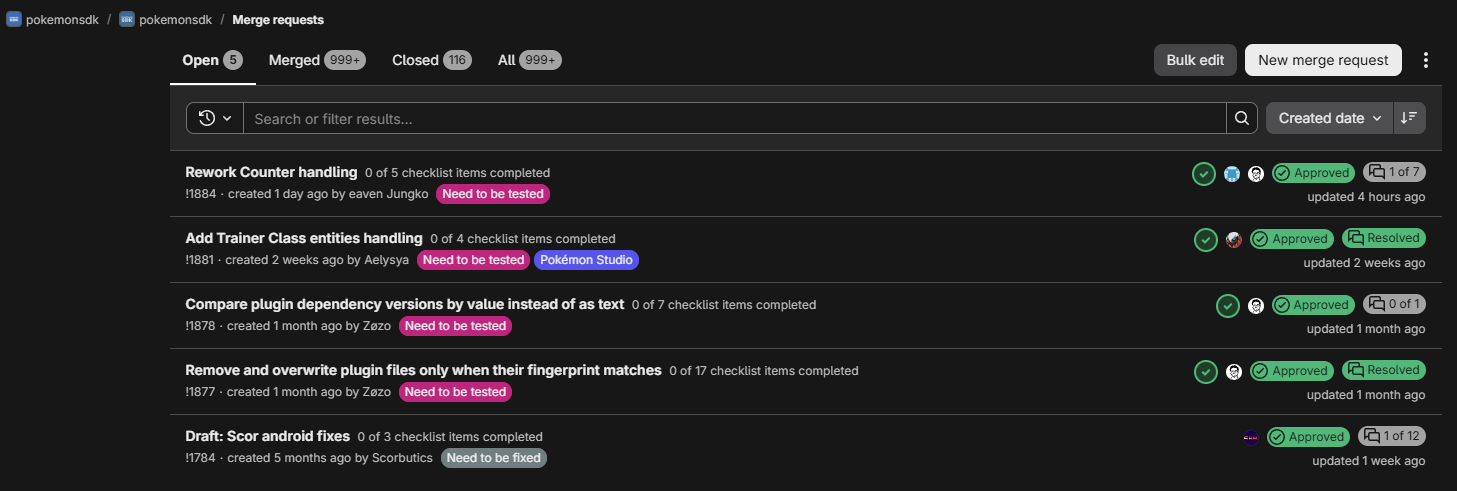
Alternatively, use the #psdk-testers-notifications Discord channel. Every Saturday morning, an automatic notification lists the Merge Requests carrying the Need to be tested label. The Team Tests role is required to access this channel.
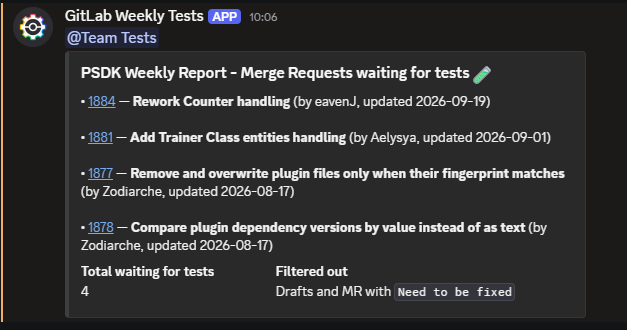
Set up a project to test a Merge Request
Every Merge Request has a number. On the GitLab list and its detail page, it appears after the exclamation mark, such as !1884. The Discord notification also shows that number.
In a terminal at the root of the PSDK project used for testing, run psdk-use mr followed by the Merge Request number. Run cmd.bat to open a terminal in the correct location.
psdk-use mr 1884
Replace 1884 with the number of the Merge Request you selected. To verify that the project is ready for testing, run psdk-cli version. Look for a line beginning with Project's PSDK git target: [mr-1884] ..., the number in square brackets must match the one passed to psdk-use.
psdk-cli version
...
Project's PSDK git target: [mr-1884] e4b98d59 Remove CounterBase
Test the changes
Before testing, read the entire Merge Request description. It gives the context, explains what changed, and may specify setup work such as installing resources before launching the game. It also lists the tests that confirm the Merge Request works as intended. It is encouraged to run additional relevant tests when you think of behavior that also needs verification.
While testing:
- Reproduce the scenario described in the Merge Request, then confirm the expected result.
- Try nearby normal and failure cases when they are practical, especially after testing a bug fix.
- Keep track of the exact steps used so you can accurately describe the issue if something fails.
- If a test is unclear or its instructions are incomplete, ask the Merge Request author for more precise instructions.
Report the result
Testers need permission to update the Merge Request checklist. Ask to be added as a tester in the #psdk-testers Discord channel. You can begin testing while you wait for a maintainer to grant access.
When every required test passes, tick the test boxes in the Merge Request description. Remove the Need to be tested label once the tests are complete, unless the Merge Request is large enough to need additional independent testing. Ask in #psdk-testers when unsure whether to remove the label.
When a test fails, report it in the Merge Request discussion. State which test was running and what happened. Use separate threads for separate issues so they remain easy to track. A Merge Request cannot be merged while it has unresolved threads. The tester who opened a thread is responsible for marking it as resolved once the discussion reaches a conclusion, not the Merge Request author.
Conclusion
- Install Ruby, Git, and
psdk-clibefore testing a Merge Request. - Find an open Merge Request with the
Need to be testedlabel, then usepsdk-use mr [ID]from the project root to check out its branch. - Follow the author’s test instructions, test related cases when practical, and ask for clarification when necessary.
- Mark successful tests in the Merge Request checklist, or report failures in its discussion.
- Ask for clarification in
#psdk-testersor the Merge Request discussion whenever the test procedure is unclear.